
CoverMe - Second Phone Number
CoverMe Secure Messenger Inc.Communication
3.11.56K Reviews
- Version
- 2.8.85
- Installs
- 1.00M
- Age Rating
- Everyone
Screenshots
Our Review of CoverMe - Second Phone Number
 Analysis by Appyee
Have you ever found yourself in need of a second phone number without the hassle of carrying around two devices? Well, let me introduce you to CoverMe - Second Phone Number. I’ve been diving into this app for a bit, and let me tell you, it’s a game-changer for anyone who values privacy and convenience.
When a separate number depends on a good connection
With a number that lives inside an app, the phone is only part of the setup: your connection matters too. I would treat CoverMe as a practical way to keep another line of communication on the same device, not as a replacement for a traditional mobile line in every situation. If I’m in a place with weak service or unreliable internet, I wouldn’t make it my only route for an urgent call or message.
That distinction affects how I’d use it day to day. For a planned conversation, I can check that my phone is connected and open the app before relying on the separate number. For an unexpected call, the experience is naturally less reassuring if I’m somewhere with patchy coverage. Keeping my ordinary number available as a backup is a sensible habit, especially for time-sensitive conversations.
Useful in specific mobile situations
I can see the appeal most clearly when I want to give a different number to a new contact without handing over the one tied to my everyday life. That could mean responding to an online listing, arranging a one-off service appointment, or keeping work conversations apart from personal ones. The benefit is not that every interaction becomes anonymous; it’s that I have another contact route to use more selectively.
A realistic example: I’m arranging a repair with someone I haven’t met before. I can share the second number for scheduling, keep the conversation in one place, and avoid adding that contact directly to the number I use with friends and family. Once the job is done, I can decide whether I want to keep using that line. I’d still avoid sharing sensitive personal details simply because a conversation is happening through a privacy-focused app.
This approach is less useful if I need one number that every colleague, friend, and service can reach without thinking about which app is active. It also isn’t automatically a substitute for a second physical SIM when dependable cellular calling is the priority. I’d choose based on the situation: an app-based extra line for separation and flexibility, or a conventional line when I need the familiar behavior and reachability of a mobile carrier.
What is CoverMe?
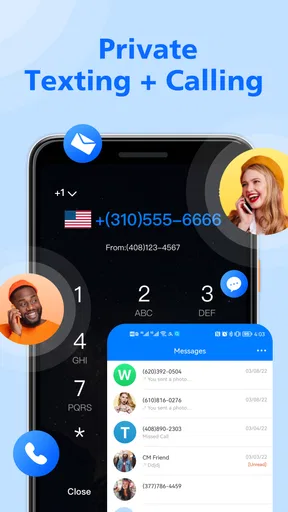
So, the basic idea behind CoverMe is pretty straightforward. It gives you a separate phone number that you can use for calls, texts, and even voicemails. This comes in super handy for work purposes, online dating, or just separating your personal life from everything else. And the best part? You don’t need another SIM card or phone. It all happens right on your current device.
Setup and Interface
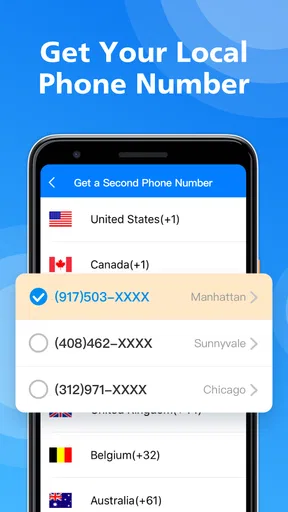
Getting started with CoverMe is a breeze. After downloading, you’re greeted with a clean interface that walks you through the setup process. You can choose a number from various regions, which is perfect if you’re looking to have a local presence in different areas.
The app itself is pretty intuitive. Navigating through the features feels natural, with everything laid out in a way that doesn’t require a tech diploma to understand. I’ve used some other apps that overcomplicate things, but CoverMe keeps it simple and user-friendly.
Privacy features need practical habits
The privacy tools are most useful when I think through what they can and cannot do for a conversation. A separate number helps me limit which number I give out, while disappearing messages can reduce how long a message remains visible in the chat. Neither choice prevents someone from saving information in another way, so I wouldn’t use a disappearing message as a guarantee that sensitive details can never be retained.
The secure vault also suits a specific workflow: keeping selected personal files apart from the ordinary photo gallery. I’d use it for material I want stored separately, then make sure I remember how I access it and keep the app available on the device I use. If I’m changing phones or managing important files, I’d plan ahead rather than assume that an app-based vault works like an independent backup.
For messages that matter, I’d also be deliberate about connectivity. I would wait for a stable connection before sending anything time-sensitive, and check that a message has actually gone through rather than assuming that tapping send means the other person has received it. That small pause is more useful than treating an encryption feature as a fix for a failed network.
Features That Stand Out
Now, let’s talk features. This app isn’t just about an extra number. It’s packed with goodies that make it worth your while.
- Private Messaging: The app offers end-to-end encryption for messages, which means you can chat away knowing your data is safe from prying eyes.
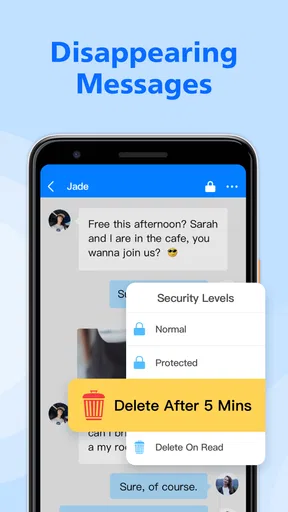
- Disappearing Messages: You can set messages to self-destruct after they’ve been read. It’s like having your own little spy gadget!
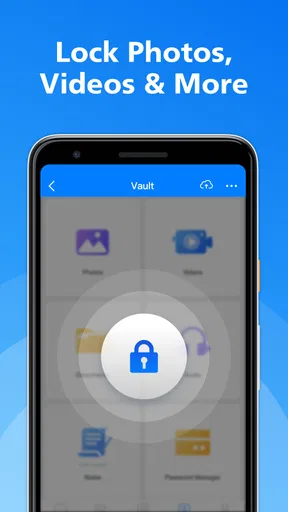
- Secure Vault: Store photos, videos, and other sensitive information in a secure vault. It’s like a digital safe that only you have the keys to.
All these features combined make CoverMe not just a second number app, but a full-fledged privacy tool.
Who is likely to get the most from it?
I’d recommend considering CoverMe if you want a separate contact number for a limited set of conversations and value having messaging and privacy features together. It may suit a freelancer separating client contact from personal chats, someone coordinating an online sale, or a person who would rather not hand a new acquaintance their main number. The app’s communication focus makes that separation easier to manage from one device.
I’d skip it if I needed a guaranteed way to reach emergency services, a business phone system with team management, or a line that works independently of an app and its connection. I’d also think twice if I rarely need a second number: paying for in-app options may not make sense when my regular line already covers everything. CoverMe is most compelling when the boundary between contacts is worth maintaining.
Performance and Reliability
I’ve been using the app for a few weeks now, and I have to say, the performance is solid. Calls and texts go through without a hitch, and the connection quality is surprisingly good. I was half expecting some lag or dropped calls, but nope, it holds up well even during extended use.
The only hiccup I encountered was a slight delay when switching between the main number and the second number. It’s nothing major, but worth noting if you’re someone who toggles between numbers frequently.
What happens when a conversation is interrupted?
When a call or message is disrupted, I’d first check whether the phone has a working connection, then return to the app and confirm the conversation’s current state before trying again. That’s a useful recovery routine for any app-based line: it reduces the chance of sending the same message twice or assuming a call connected when it did not. If a conversation is important, I’d agree on a backup way to get in touch before relying on the extra number.
Switching between a personal line and an app-based one also takes a little attention. Before replying, I’d check which number I’m using, particularly when answering a new contact or moving quickly between work and personal messages. That quick glance can prevent the awkward mistake of contacting someone from the wrong line, and it matters more than the small delay itself.
Subscription and Pricing
Now, let’s talk about the financial side of things. CoverMe offers a range of subscription options, which gives you flexibility depending on how often you plan to use it. There’s a free trial available, which is great for testing the waters.
The pricing is competitive, and while it might be a bit on the higher side compared to some other apps, the array of features and reliability make it a worthy investment if privacy is your top priority.
CoverMe is free to install, with optional in-app purchases priced from under a dollar to just under a hundred dollars per item. I’d check what an option includes before committing, then judge the cost against how often I’ll actually use the second line. Someone who needs it for occasional arrangements may have a different calculation from someone who expects regular work calls and messages.
It is a communication app from CoverMe Secure Messenger Inc., and it has been available since July 2013. Its current version is 2.8.85, and it requires Android 7.0 or later. The app is rated for Everyone; it has an average rating of 3.1 from around 10,000 ratings, with about 1,600 written reviews and over 1 million installs. Those figures suggest plenty of people have tried it, but the modest average is a reason to test your own routine rather than assume the experience will suit everyone.
Final Thoughts
In a world where privacy is increasingly hard to come by, CoverMe - Second Phone Number stands out as a reliable ally. Whether you’re looking to keep your work and personal life separate, or just need a secure way to communicate, this app has got you covered.
While there are a few minor kinks, like the occasional delay in number switching, the overall experience is smooth and satisfying. So, if you’re in the market for a second phone number that offers robust privacy tools, give CoverMe a shot. Trust me, your privacy will thank you.
My connectivity verdict
Against ordinary messaging apps, CoverMe’s strongest distinction is the combination of a separate number with privacy-oriented tools; a standard chat app may be simpler when everyone already uses it, but it won’t necessarily give me the same separation from my main number. A second SIM, meanwhile, can be a better fit when conventional mobile-line availability matters more than keeping everything inside one app. The right choice depends on whether I value separation, familiar reachability, or convenience most.
Overall, I see CoverMe as a focused option rather than a universal communication replacement. I’d use it for selected contacts, keep an eye on my connection, and maintain another way to reach people when a conversation is important. If those habits fit how you communicate, the app’s extra number and privacy features can be useful. If uninterrupted access is the main goal, I’d choose a regular carrier line instead.
Verdict
Strengths of CoverMe - Second Phone Number
- Easy setup for multiple phone numbers.
- Strong encryption for secure messaging.
- User-friendly interface and navigation.
- Customizable voicemail and greetings.
- Affordable subscription options.
Limitations of CoverMe - Second Phone Number
- Limited free features available.
- Occasional connectivity issues reported.
- Ads can be intrusive at times.
- International calls might incur extra costs.
- Not all features available on iOS.
Similar Picks in This Category
View All
Google Messages
Google LLC4.6

Gmail
Google LLC4.1

Google Meet
Google LLC4.4

Google Chrome
Google LLC4.1

WhatsApp Messenger
WhatsApp LLC4.6

Carrier Services
Google LLC4.2
Frequently Asked Questions
What is CoverMe and how does it work?
CoverMe is an app designed to provide users with a second phone number for privacy and security. It allows you to make calls and send texts from your second number, keeping your personal number private. This is particularly useful for business, online transactions, or when you want to separate your personal and professional communications.
How secure is CoverMe for protecting my personal information?
CoverMe offers robust security features, including end-to-end encryption for your calls and texts. It also provides a private vault to store sensitive information securely. This ensures that your personal data remains confidential and protected from unauthorized access.
Can I use CoverMe internationally?
Yes, CoverMe can be used internationally, allowing you to make calls and send texts to over 200 countries. This feature makes it an excellent choice for travelers who need a reliable and cost-effective way to stay connected without incurring high roaming charges.
What are the costs associated with using CoverMe?
CoverMe offers a variety of pricing plans to suit different needs, including pay-as-you-go options and monthly subscriptions. While the app itself is free to download, purchasing credits or a subscription is required for making calls and sending texts. Users should review the pricing details within the app for specific rates.
Does CoverMe affect my phone’s performance or battery life?
CoverMe is designed to run efficiently without significantly impacting your phone’s performance or battery life. It operates in the background and uses minimal resources, ensuring that you can continue to use your device normally while benefiting from the app’s features.
